
IDPRT Not Connecting? Setup & Troubleshooting
Category: Troubleshooting · Brand: IDPRT
An IDPRT printer not connecting usually isn't a Bluetooth story at all, which trips people up because every other label printer brand seems to live and die by its mobile app. I've set a few of these up for warehouse and shipping use, and the honest answer is: start with the cable, not your phone — this printer doesn't want to text you, it wants a wire.
IDPRT Driver Setup: The Path Most IDPRT Printers Actually Use
Unlike Niimbot, MUNBYN, Phomemo, and MakeID, most of IDPRT's lineup is built around USB and shipping-platform integration rather than phone app pairing — these are industrial and small-business barcode/shipping printers first. Confirm the printer is powered on (there's an indicator light on the front) and connected via USB before troubleshooting anything wireless.
- Plug the printer in with the included USB cable and power it on.
- Install the current driver for your exact model from IDPRT's site — driver mismatches between similar model numbers are a common, avoidable cause of "connected but not printing," like showing up to the wrong house with the right gift.
- Install the iDPRT Label Printer Utility Tool if you're designing labels rather than printing from a shipping platform directly.
- Print a test label before connecting to any third-party platform, so you know the base connection works before adding more variables.
Bluetooth Setup for the SP410BT (and Similar BT Models)
If your specific model has Bluetooth (the SP410BT is the common one), that's the exception to the USB-first rule above, and it connects a little differently than most label printers — including directly to Windows 11 rather than through a phone app for many use cases.
- On Windows 11, go to Settings > Bluetooth & devices, turn Bluetooth on, and put the printer in pairing mode per its manual.
- Select the printer from the discovered devices list and complete pairing.
- If it doesn't appear, confirm you're using a Bluetooth-specific model — plenty of IDPRT printers simply don't have Bluetooth hardware at all, and no amount of troubleshooting fixes a feature that isn't there.
What's Actually Going Wrong?
| Symptom | Likely Cause | Fix |
| Printer not detected on PC at all | USB connection issue or missing driver | Try a different USB port/cable; reinstall the current driver for your exact model |
| Driver installs but printer won't print | Wrong driver for your specific model number | Confirm the exact model (e.g., SP410 vs. SP410BT) before reinstalling |
| Bluetooth device not found in Windows | Model doesn't have Bluetooth, or not in pairing mode | Confirm your model supports Bluetooth; re-enter pairing mode per the manual |
| Prints blank labels despite connecting fine | Label stock or sensor calibration issue, not a connection problem | Recalibrate the label sensor per the manual; confirm correct label stock is loaded |
Shipping Platform Integration
A lot of IDPRT's own support content is organized around specific platforms — ShipStation, Etsy, UPS — rather than generic troubleshooting, which tells you a lot about who actually buys these. If you're setting one up for order fulfillment, install the driver and confirm a basic test print works first, then add the platform integration second. Troubleshooting a platform connection on top of an unconfirmed printer connection is how a five-minute setup turns into an hour.
FAQ
Do all IDPRT printers have Bluetooth?
No — most of the lineup is USB-focused. Bluetooth is limited to specific models like the SP410BT. Check your exact model before assuming a feature exists.
Why won't my IDPRT printer show up in Windows Bluetooth settings?
Either your model doesn't have Bluetooth hardware, or it's not currently in pairing mode. Confirm both before troubleshooting further.
My IDPRT printer connects but prints blank labels — is that a connection problem?
No — that's almost always a label sensor calibration or label stock issue, separate from connectivity. Recalibrate the sensor per your model's manual.
Should I set up ShipStation or Etsy integration before or after confirming the printer works?
After. Confirm a basic test print works over USB first, so you're not troubleshooting a platform issue and a printer issue at the same time.
Amazon Affiliate Picks
If your printer connects over Bluetooth through a phone app instead, our Niimbot, MUNBYN, Phomemo, and MakeID guides are the better fit, and our IDPRT product page has more on current models.
Recommended IDPRT Printers

IDPRT SP410 Thermal Barcode Label Printer
The IDPRT SP410 thermal label printer offers 203 DPI output at 4 inches per second with support for …
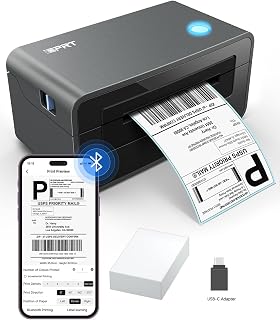
IDPRT SP420 Thermal Label Printer
The IDPRT SP420 supports 2–4.65 inch label widths and is compatible with Windows, Mac, and Linux — a…